Run your first Byte Lens check
From your dashboard to a finished report in a few minutes.
Before you start
- You need a free Frontline account and your website address.
- Byte Lens only reads your public website and public sources. You never share a password.
- Free assessments: one per website every 30 days. A Full Report uses one Full Report credit you bought.
Run the check
Step 1: On your dashboard, open Byte Lens in the sidebar. You will see your free assessment status and any Full Report credit on your account.
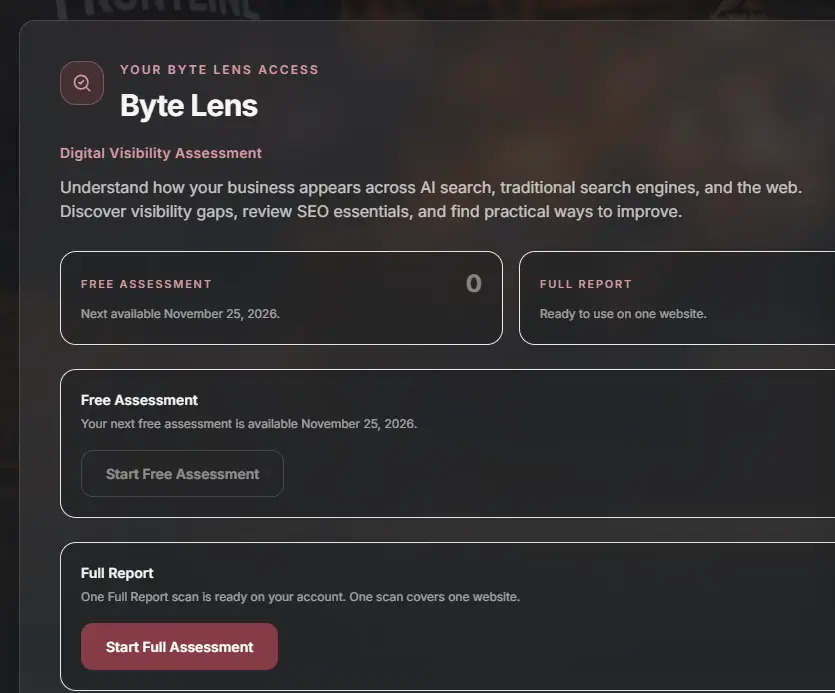
Step 2: Click Start Free Assessment, or Start Full Assessment if you have bought a Full Report.
Step 3: Enter your website URL and pick your industry. Add your city and state if you serve a local area, or leave it blank if you sell everywhere online.
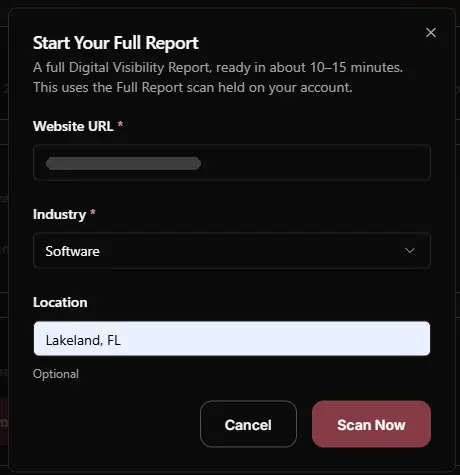
Step 4: Click Scan Now. A free assessment usually takes about 2 minutes. A Full Report takes about 10 to 15 minutes.
Step 5: When it finishes, the report shows up under Your reports marked Ready, and we email you. Click Download PDF to open it.

What to do next
Read the short version at the top of your report first, then work through the fixes in order. To measure progress, run another check after you make changes.
How to read your report